
BSRN Data Retrieval#
This tutorial covers how to browse the BSRN FTP inventory and download station-to-archive files.
1. Setup#
BSRN FTP requires credentials. Obtain them by emailing Amelie Driemel at amelie.Driemel@awi.de.
[ ]:
import os
import bsrn

# Replace with your BSRN FTP credentials
BSRN_USER = os.environ.get("BSRN_USER", "your_username")
BSRN_PASS = os.environ.get("BSRN_PASS", "your_password")
username = BSRN_USER
password = BSRN_PASS

# §4 download target (absolute path)
ARCHIVE_DATA_DIR = "/Volumes/Macintosh Research/Data/bsrn-qc/data/QIQ"
2. Check file inventory#
Before downloading, you can check which files are available for specific stations. Here we check the inventory for ASP, PAY, QIQ, and TAT stations.
[2]:
stations = ['ASP', 'PAY', 'QIQ', 'TAT']
inventory = bsrn.io.retrieval.get_bsrn_file_inventory(stations, username, password)

for stn, files in inventory.items():
    print(f"{stn}: {len(files)} files available")
    if files:
        print(f"  First file: {files[0]}")
        print(f"  Last file:  {files[-1]}")
[1/4] Fetching inventory for station ASP...
[2/4] Fetching inventory for station PAY...
[3/4] Fetching inventory for station QIQ...
[4/4] Fetching inventory for station TAT...
ASP: 301 files available
  First file: asp0100.dat.gz
  Last file:  asp1299.dat.gz
PAY: 399 files available
  First file: pay0100.dat.gz
  Last file:  pay1299.dat.gz
QIQ: 14 files available
  First file: qiq0124.dat.gz
  Last file:  qiq1224.dat.gz
TAT: 356 files available
  First file: tat0100.dat.gz
  Last file:  tat1299.dat.gz
3. Visualize archive availability#
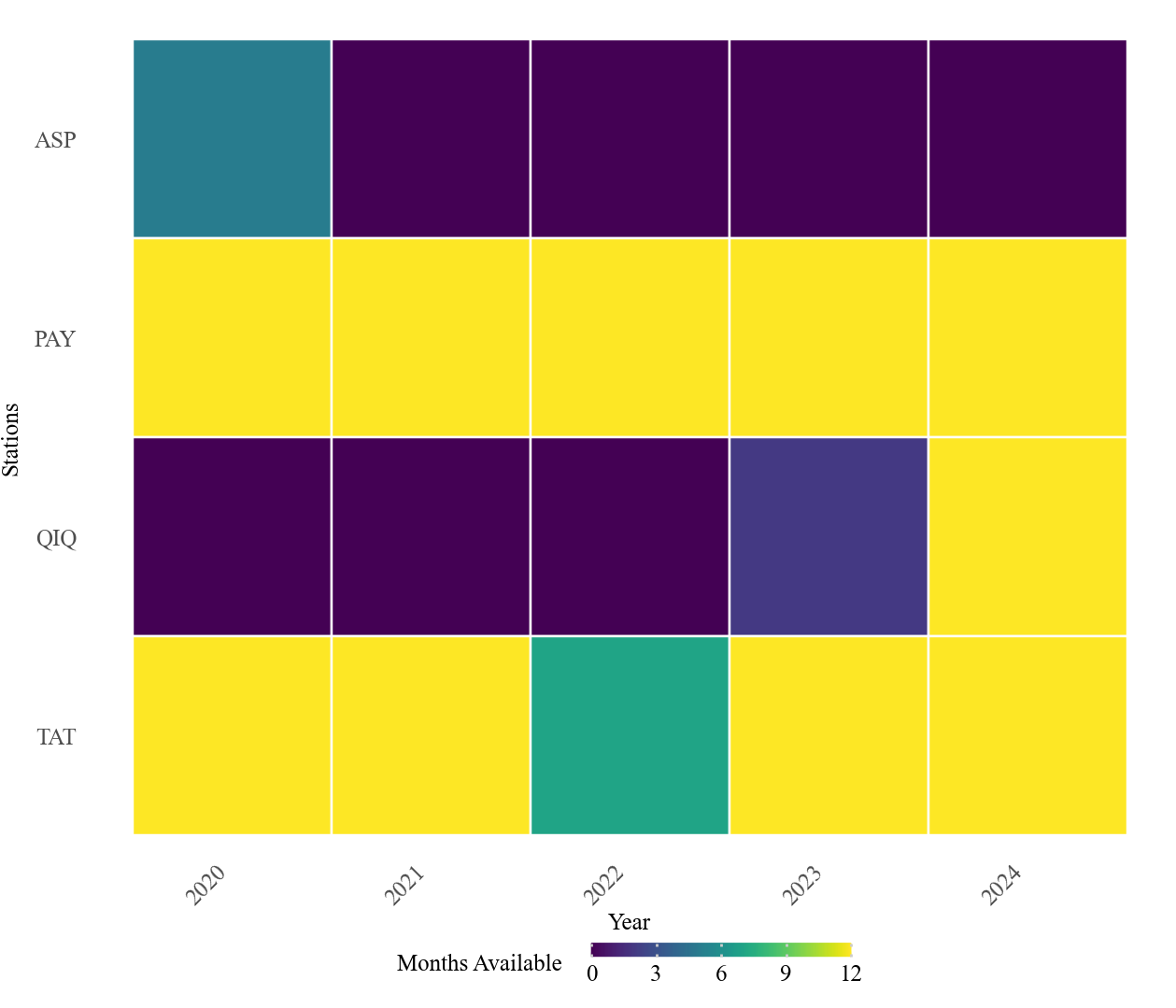
plot_bsrn_availability draws a heatmap of which monthly station-to-archive files exist on the BSRN FTP (years × months) for the stations you choose. It uses the same credentials as above and calls the inventory internally.
[3]:
from bsrn.visualization import plot_bsrn_availability

# Heatmap of monthly .dat.gz presence on FTP for the same stations as in §2 (narrow year span for speed).
fig = plot_bsrn_availability(
    stations=stations,
    username=username,
    password=password,
    start_year=2020,
    end_year=2024,
    output_file=None,  # e.g. "qiq_availability.png" to save next to the notebook
)
fig
Searching BSRN FTP for stations: ASP, PAY, QIQ, TAT...
[1/4] Fetching inventory for station ASP...
[2/4] Fetching inventory for station PAY...
[3/4] Fetching inventory for station QIQ...
[4/4] Fetching inventory for station TAT...
[3]:
4. Download QIQ 2024 data#
Download all 12 monthly files for the QIQ station for the year 2024.
[4]:
OUTPUT_DIR = ARCHIVE_DATA_DIR
os.makedirs(OUTPUT_DIR, exist_ok=True)

# Construct filenames for 2024 (qiq0124.dat.gz to qiq1224.dat.gz)
filenames = [f"qiq{m:02d}24.dat.gz" for m in range(1, 13)]

print(f"Downloading to {OUTPUT_DIR}")
print("-" * 50)

paths = bsrn.io.retrieval.download_bsrn_files(
    filenames=filenames,
    local_dir=OUTPUT_DIR,
    username=username,
    password=password
)

for fn, p in zip(filenames, paths):
    status = "OK" if p else "FAILED"
    print(f"  {fn}: {status}")

ok = sum(1 for p in paths if p)
print("-" * 50)
print(f"Done. {ok}/{len(paths)} files downloaded.")
Downloading to /Volumes/Macintosh Research/Data/bsrn-qc/data/QIQ
--------------------------------------------------
  qiq0124.dat.gz: OK
  qiq0224.dat.gz: OK
  qiq0324.dat.gz: OK
  qiq0424.dat.gz: OK
  qiq0524.dat.gz: OK
  qiq0624.dat.gz: OK
  qiq0724.dat.gz: OK
  qiq0824.dat.gz: OK
  qiq0924.dat.gz: OK
  qiq1024.dat.gz: OK
  qiq1124.dat.gz: OK
  qiq1224.dat.gz: OK
--------------------------------------------------
Done. 12/12 files downloaded.